Understand the system.
Know your next step.
Practical NetApp ONTAP and SAN switching guides, organized around the work you need to do.
- 01PrepareScope, prerequisites and example scenario
- 02Work throughSteps, commands and decisions explained
- 03VerifyAcceptance checks and official references
Build your storage knowledge, one guide at a time.
A rotating selection from the handbook. New to the topic? Start with its scope and example scenario.
Choose a learning path →A daily rotation of existing guides, not a new publication.Keep useful guides close.
Open any guide and select “Save guide” to build your own reference list.
Saved in this browser. No account required.Two fabrics.
One clearer picture.
Follow the connection from the host to the LUN, then work through zoning, presentation and path validation.
Explore the walkthrough ↗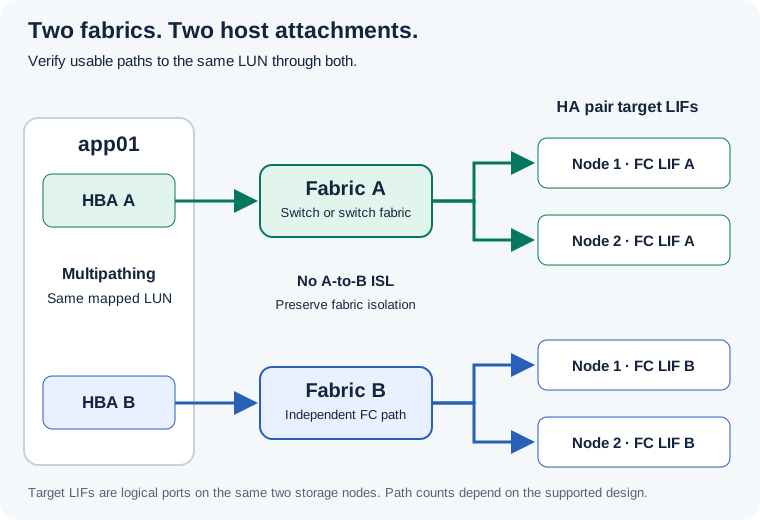
What are you working on?
Turn an assumption into a number.
Quick planning estimates calculated on this device. No values are sent to a calculator service.
Find the procedure you need.
Browse a collection, choose a topic, or search a symptom or command.
Build & configure
Hardware, clusters, SVMs and client connectivity.
Install an HA pair and shelves
Site preparation, rack, cable, first boot, and acceptance.
5 sections · Read guide ConfigurationConfigure a new ONTAP cluster
Bootstrap, join nodes, management, time, DNS, and health.
5 sections · Read guide ConfigurationCreate an SVM and data network
A protocol-ready storage VM with correct data LIF placement.
5 sections · Read guide ConfigurationProvision aggregates and volumes
Capacity planning, volume creation, junctions, and verification.
6 sections · Read guide NASConfigure NFS access end to end
Build a Linux NFSv4.1 export, verify namespace traversal and identity, and diagnose mount versus write failures.
6 sections · Read guide NASConfigure SMB and Active Directory
Join an SVM to Active Directory, create a restricted share, separate share and NTFS permissions, and validate a Windows client.
6 sections · Read guide SANProvision an iSCSI LUN
Target LIFs, initiator, igroup, LUN, mapping, multipath.
6 sections · Read guide SANProvision a Fibre Channel LUN
Build a two-fabric zoning matrix, provision one ESXi LUN, verify device identity and paths, and rehearse loss of one fabric.
6 sections · Read guideProtect & recover
Recovery points, replication and disaster recovery planning.
Set up Snapshot-based recovery
Policy, retention, capacity, and file-level restore.
6 sections · Read guide Data ProtectionBuild an asynchronous SnapMirror relationship
Peer, destination, policy, initialize, and monitor.
6 sections · Read guide Disaster RecoveryExecute volume-level DR failover and failback
Use a single-writer decision, measure the recoverable point, activate an asynchronous volume mirror, validate the application, and reverse protection safely.
7 sections · Read guide Data ProtectionRestore a file, volume, or replicated copy
Choose the smallest safe recovery scope and test the result.
5 sections · Read guide Data ProtectionDesign long-term backup with SnapMirror vault
Retention labels, off-cluster copy, restore testing, and monitoring.
4 sections · Read guide Disaster RecoveryPlan an SVM disaster recovery relationship
Replicate SVM configuration and validate destination activation.
4 sections · Read guide Disaster RecoveryMetroCluster switchover and switchback checklist
Prechecks, switchover decision, healing, and return to normal.
4 sections · Read guideOperate & troubleshoot
Health checks, incident investigation, security and upgrades.
Daily and weekly health operations
An auditable routine for hardware, capacity, protocols, and protection.
5 sections · Read guide TroubleshootingVolume or aggregate full: triage and recovery
Separate a full volume from aggregate physical exhaustion, calculate a temporary runway, and choose a recovery action without sacrificing needed recovery points.
6 sections · Read guide TroubleshootingNFS or SMB client cannot access data
Trace name, network, protocol, export/share, and identity in order.
5 sections · Read guide TroubleshootingLUN missing or paths degraded
Find the first broken link from HBA to LUN map.
6 sections · Read guide TroubleshootingInvestigate HA takeover or giveback alerts
Confirm ownership, hardware health, and client service before action.
4 sections · Read guide TroubleshootingInvestigate high storage latency
Collect time-aligned application and ONTAP metrics, distinguish throughput from latency, and test one causal hypothesis at a time.
6 sections · Read guide SecurityHarden access and protect recovery points
Admin roles, MFA, audit, ransomware controls, and tested recovery.
4 sections · Read guide Upgrades & FirmwareONTAP upgrade: prechecks, ANDU commands and postchecks
A worked HA-pair upgrade with compatibility checks, configuration backup, image staging, validation, pause/resume decisions and service acceptance.
14 sections · Read guide SecurityConfigure Vscan antivirus for SMB
Scanner servers, Antivirus Connector, scanner pool, on-access policy, validation and fault isolation.
6 sections · Read guide SecurityConfigure FPolicy file monitoring
Event, external or native engine, policy, scope, enablement, validation and troubleshooting.
7 sections · Read guide Upgrades & FirmwarePost-upgrade checks: ONTAP, firmware, DQP and client service
A practical acceptance checklist with read-only commands, expected results, scoped LIF correction, Linux/Windows tests and failed-check decisions.
12 sections · Read guide Upgrades & FirmwareDQP update: download, install and verify every ONTAP node
Refresh the Disk Qualification Package with explicit per-node commands, package identity checks, mismatch troubleshooting and post-update acceptance.
9 sections · Read guide Upgrades & FirmwareNetApp firmware upgrades: disks, shelves, SP/BMC and BIOS
Identify the component and package, use the appropriate update method, monitor active revisions, and verify HA, storage paths and client service afterward.
17 sections · Read guideSAN switching
Separate learning tracks for Brocade and Cisco MDS fabrics.
FC SAN switch foundations: hardware, fabrics, logins and storage access
Start with a two-fabric design, install and label the hardware, trace a host-to-LUN connection, and build a useful change and postcheck record.
11 sections · Read guide SAN Switch FundamentalsBrocade and Cisco SAN interview questions: basic to advanced scenarios
32 explained answers covering FC fundamentals, vendor zoning, fabric architecture, performance, upgrades and practical incident decisions.
32 sections · Read guide Brocade SANBrocade SAN basics: installation, management, ports and FC logins
Commission a Brocade FC switch, select the right logical fabric, identify connected WWPNs and establish a healthy baseline before zoning.
10 sections · Read guide Brocade SANBrocade zoning: aliases, effective configurations and Peer Zoning
Create WWPN zones, safely extend an existing configuration, distinguish saving from activation, and work through peer zoning and scoped reversal.
11 sections · Read guide Brocade SANBrocade advanced: ISLs, trunking, Virtual Fabrics and FOS upgrades
Plan fabric joins, investigate trunk formation, understand Access Gateway/VF boundaries, preserve the full configuration scope and upgrade with service postchecks.
12 sections · Read guide Brocade SANBrocade troubleshooting: ports, zoning, segmentation, optics and slow drain
Use timestamped evidence and worked incidents to find the failed stage, distinguish media faults from credit pressure, and prove the service after correction.
11 sections · Read guide Cisco MDS SANCisco MDS basics: installation, initial setup, VSANs and FC host ports
Prepare an MDS switch, identify its hardware and management plane, create a lab VSAN, attach an FC host and verify real device logins.
10 sections · Read guide Cisco MDS SANCisco MDS zoning: pWWNs, aliases, basic mode and enhanced commits
Add a host without replacing production access, distinguish active/full/pending state, and validate basic or enhanced zoning with a scoped recovery example.
12 sections · Read guide Cisco MDS SANCisco MDS advanced: ISLs, FC port channels, NPV and NX-OS upgrades
Build controlled fabric connectivity, understand NPV and IVR boundaries, back up correctly, and perform a release-qualified upgrade with impact and client postchecks.
11 sections · Read guide Cisco MDS SANCisco MDS troubleshooting: missing LUNs, isolated VSANs and slow drain
Diagnose FC problems by failed stage, with command sequences, worked counter examples, scoped corrections and postchecks for common incidents.
10 sections · Read guideCloud & automation
Migration procedures and downloadable script examples.
Use the ONTAP REST API safely
Discover endpoints, authenticate, inspect, change, and verify.
5 sections · Read guide Cloud MigrationMigrate ONTAP NAS to Amazon FSx for ONTAP
SnapMirror migration from on-premises ONTAP to AWS with peering, incremental sync, cutover and rollback.
7 sections · Read guide Cloud MigrationMigrate NetApp SMB shares to Azure Files
Azure Files SMB destination, AD identity, Robocopy seed, delta sync, cutover and validation.
6 sections · Read guide Cloud MigrationMigrate NetApp NFS data to Azure Files NFS
NFSv4.1 compatibility, private networking, file copy, metadata checks and Linux client cutover.
6 sections · Read guide Cloud MigrationMigrate ONTAP volumes to Azure NetApp Files
Azure NetApp Files migration assistant, peering, replication, dry run, cutover and finalization.
6 sections · Read guide AutomationDaily ONTAP health check with Bash and SSH
Collect read-only cluster, HA, alerts, capacity, volume and SnapMirror output from every inventory entry; schedule and review it daily.
3 sections · Read guide AutomationPowerShell health check and CSV inventory
Call ONTAP REST for every cluster in a dummy CSV, export daily health and volume inventories, and handle pagination and TLS.
4 sections · Read guide AutomationPython ONTAP health and volume inventory scripts
Use a shared REST helper for secure pagination, daily CSV health reports and a separate complete volume export.
4 sections · Read guideInterview preparation
Concepts and scenario questions from basic to expert.
NAS interview questions and detailed answers
NFS, SMB, SVMs, permissions, multiprotocol access, protection and operations.
7 sections · Read guide Interview Q&ANAS scenario-based interview questions
Realistic NFS/SMB outages, migration, antivirus and recovery cases with investigative answers.
6 sections · Read guide Interview Q&ASAN interview questions and detailed answers
LUN presentation, FC zoning, iSCSI, ALUA, SLM, multipath and host safety.
7 sections · Read guide Interview Q&ASAN scenario-based interview questions
Missing LUN, lost path, high latency, thin provisioning and disaster recovery.
6 sections · Read guide Interview Q&ANetApp interview: basic questions and answers
Ten foundation questions on ONTAP objects, NAS, SAN, snapshots, capacity and health.
10 sections · Read guide Interview Q&ANetApp interview: intermediate operations
Ten operational questions on access, paths, snapshots, QoS, capacity and change validation.
10 sections · Read guide Interview Q&ANetApp interview: advanced troubleshooting
Ten deeper cases on DR lag, multipath, identity, security, ransomware and performance.
10 sections · Read guide Interview Q&ANetApp interview: expert architecture scenarios
Ten design and incident questions on multi-site DR, mixed protocols, cloud migration and automation.
10 sections · Read guide Interview Q&AQoS, SMB share performance and FlexCache: interview questions and scenarios
15 explained answers covering IOPS, throughput and latency, QoS scope, share-to-volume mapping, evidence-led SMB diagnosis and FlexCache read/write behavior.
16 sections · Read guideNo matching guides. Try a shorter search or select All guides.
Examples to learn from. Checks to think through.
Commands and outputs are illustrative, with fictional names. Check the platform and release scope before using a procedure in your environment.